UI form (React)
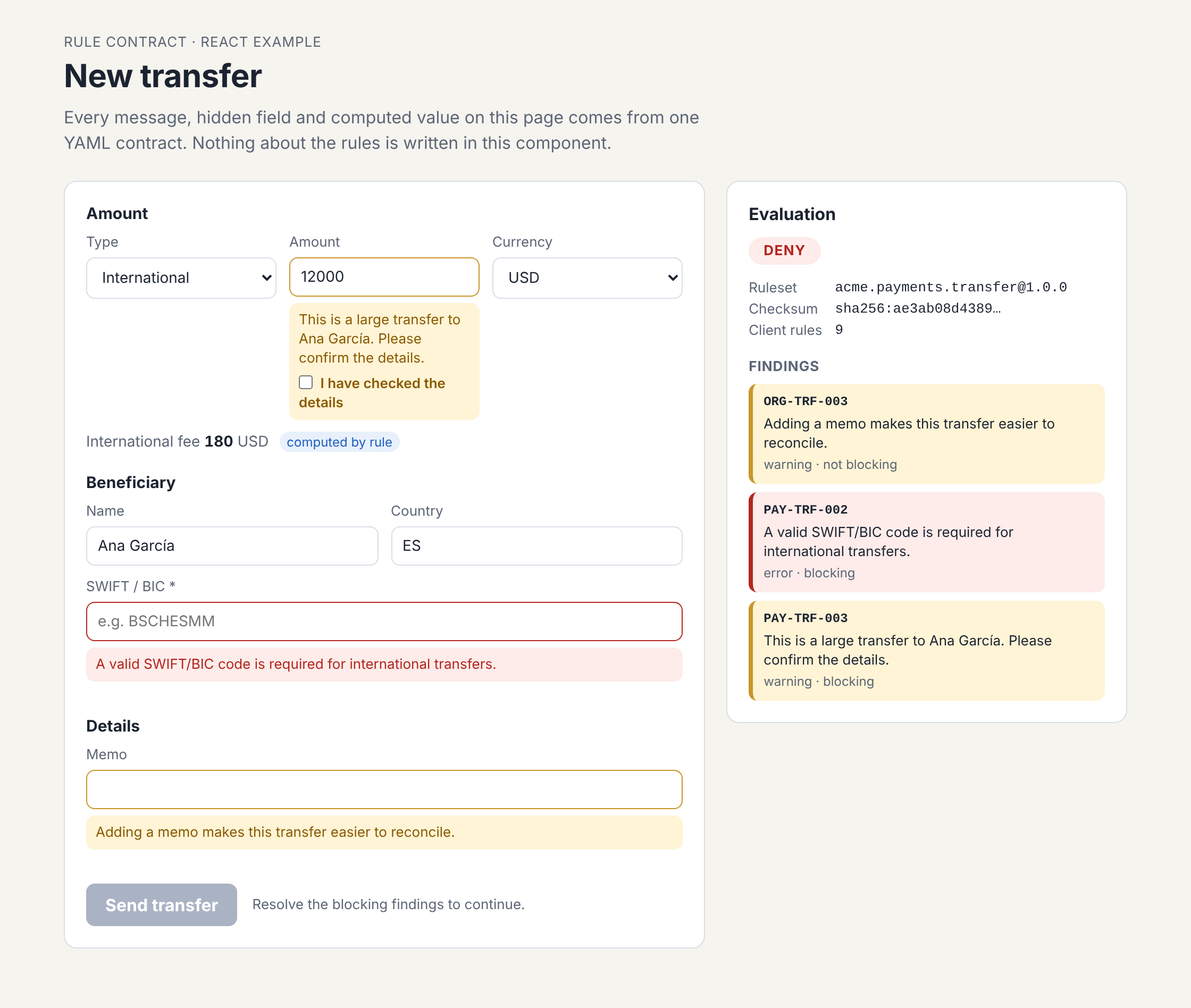
A transfer form whose hidden fields, computed fee, warnings and blocked submit all come from the client manifest.
Code: examples/frontend-react
(README). CI builds it on every push.
Run it
npm ci
npm run build                                            # the runtime the example links to
npm run dev -w rule-cascade-example-frontend-react| Do this | The contract responds with |
|---|---|
| Switch Type to International | The SWIFT field appears and becomes required (state rule), and a fee is computed (compute rule) |
| Enter an amount of 10000 or more | A warning that blocks until you tick the acknowledgement |
| Enter an amount above 25000 | An error only a risk-officer may accept |
| Clear the memo | A non-blocking warning |
Done when each row behaves as described. The screenshot above is an international transfer of 12000 USD with no SWIFT code: the fee of 180 is computed, the SWIFT field is required, and the three findings keep Send transfer disabled.
How it is built
Every listing is read from the example when the site is built.
Convert the form state to the entity the contract talks about
From src/TransferForm.tsx.
Empty inputs become null, not "", so a required rule sees a missing value:
/** Form state -> the entity shape the contract talks about. Empty inputs become null, not "". */
function toEntity(d: TransferDraft) {
  return {
    type: d.type,
    amount: d.amount.trim() === '' || Number.isNaN(Number(d.amount)) ? null : Number(d.amount),
    currency: d.currency,
    memo: d.memo,
    beneficiary: { name: d.name, country: d.country.toUpperCase(), swiftCode: d.swiftCode.trim() === '' ? null : d.swiftCode.trim() },
  };
}
Evaluate on every change with the hook
const resolutions: Resolution[] = acknowledged.map((rule) => ({ rule, type: 'acknowledge' }));
const request: EvaluationRequest = {
  entity: 'Transfer',
  operation: 'create',
  data: toEntity(draft),
  actor: { id: 'u-1', roles: ['teller'] },
  resolutions,
};
const { result, allowed, findings, states, computed, findingsFor } = useRuleEvaluation(manifest, request);
Draw the fields from the result
// Field state comes from `state` rules. A field the contract does not mention keeps the app's default.
const swift = states['/beneficiary/swiftCode'] ?? {};
const fee = computed['/fee'];
Done when switching Type to International marks the SWIFT field required and shows the computed fee, as in the screenshot above.
Read the manifest
The manifest is the generated
src/manifest.client.json,
so the example runs without a backend. Its head: the channel is client, and the checksum is the
same as the server's for the same ruleset version.
"ruleCascade": "1.0.0",
"id": "acme.payments.transfer",
"version": "1.0.0",
"checksum": "sha256:c192dd53b5b1d307d52ccbc27fc1674114e8714d53b699b24088a648ae242c7e",
"channel": "client",
"conflictPolicy": "priority",
"defaultLocale": "en",
"params": {
  "maxTransferAmount": 25000,
  "internationalFeeRate": 0.015,
  "largeTransferThreshold": 10000
Against a real service, src/App.tsx notes the one change:
*   const client = createManifestClient({ baseUrl: '/api/rules', onStale: ({ error }) => console.warn(error) });
*   const manifest = await client.get('acme.payments.transfer');
The client manifest has 9 of the 14 rules: the four enforcement: server rules (blocked country,
currency immutable, delete only drafts, four eyes) and the action rule are not in it. A client pass therefore never guarantees the server will accept.
Step by step: Add rule enforcement to a React form.
OpenAPI contract
The payments API description and its ruleset bound to each other - entities reference schemas, operations carry x-rule-cascade, and baseline rules are derived from schema constraints.
API endpoint
A payments API that loads the ruleset at start-up and, on every operation, evaluates, refuses with 422, persists, and runs the commands once.